Controlling a BLE Battery with an ESP32 and Home Assistant
How I connected a JBD BMS lithium battery over Bluetooth Low Energy using an ESP32 as a BLE proxy, and how I control charging and discharging safely in Home Assistant.
I have a lithium battery with a JBD BMS (Battery Management System) sitting in my office. Out of the box, it only talks over Bluetooth Low Energy (BLE)—which is fine if you want to stand next to it with a phone app, but completely useless if you want to automate it in Home Assistant.
Instead of running a USB-to-RS485 cable across the room, I used a cheap ESP32 running ESPHome as a BLE bridge (ble-exporter). That gives me full visibility into the battery's state and—more importantly—control over its charging switch directly from Home Assistant.
The ESP32 BLE Bridge
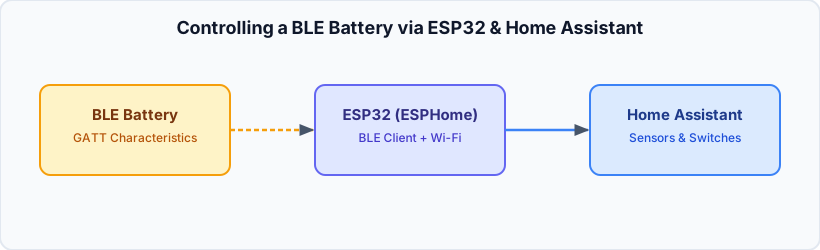
The ESP32 sits near the battery and acts as a Bluetooth proxy/exporter. Once it's connected to the JBD BMS over BLE, Home Assistant gets a whole set of entities:
- State of Charge (SoC):
sensor.jbd_bms_ble_jbd_bms_ble_state_of_charge - Cell Voltages:
sensor.jbd_bms_ble_jbd_bms_ble_cell_voltage_*, plus min, max, average, anddelta_cell_voltage - Current & Remaining Capacity:
sensor.jbd_bms_ble_*_currentandsensor.jbd_bms_ble_*_capacity_remaining - Charging Control:
switch.jbd_bms_ble_jbd_bms_ble_charging
One thing I learned quickly: JBD BMS units only allow one active BLE connection at a time. If your phone app is connected, the ESP32 won't be able to read or control anything until you close the app.
Controlling Charging in Scripts
Having switch.jbd_bms_ble_jbd_bms_ble_charging in Home Assistant means I can cleanly disable charging at the BMS level whenever I switch my office into island (battery) mode. In my scripts.yaml, the switch-over sequence turns off the charger smart plug and the BMS charging switch first, waits a few seconds for the load to stabilize, and then switches the inverter and load:
office_stromquelle_auf_batterie:
  alias: "Office-Stromquelle: Umschalten auf Batterie (Inselbetrieb)"
  mode: single
  sequence:
    - action: switch.turn_off
      target:
        entity_id:
          - switch.jbd_bms_ble_jbd_bms_ble_charging
    - action: light.turn_off
      target:
        entity_id: light.shelly_office_charger
    - delay:
        seconds: 5
    # ... disconnect load, wait, switch inverter, reconnect load
Safety Automations
Leaving a battery to discharge unattended without a fallback is asking for trouble. I have two layers of protection in automations.yaml that watch sensor.jbd_bms_ble_jbd_bms_ble_state_of_charge:
- Normal discharge limit (≤ 10% SoC): Switches the office back to grid power, puts the battery controller into
standby, and sends me a Telegram message. - Emergency fallback (≤ 5% SoC): Regardless of what mode anything is in, it forces the grid power plugs back on and sends a critical alert.
- id: buro_office_batterie_notstrom_fallback
  alias: 'Büro: Notstrom-Fallback bei schwacher Office-Batterie'
  trigger:
    - trigger: numeric_state
      entity_id: sensor.jbd_bms_ble_jbd_bms_ble_state_of_charge
      below: 6
  action:
    - action: switch.turn_on
      target:
        entity_id:
          - switch.plug_office_no_ups
          - switch.plug_office_river
    - action: telegram_bot.send_message
      data:
        chat_id: !secret telegram_chat_id
        message: '🪫 Office-Batterie: Ladestand kritisch ({{ states("sensor.jbd_bms_ble_jbd_bms_ble_state_of_charge") }}%), reguläre Stromversorgung wiederhergestellt.'
What to Watch Out For
- Recorder bloat: Cell voltages and current update frequently. I excluded
sensor.jbd_bms_ble_jbd_bms_ble_cell_voltage_*and a few other noisy sensors from Home Assistant's recorder inconfiguration.yamlso my database doesn't grow unnecessarily. - BLE range: Keep the ESP32 close to the battery. Metal battery cases or nearby inverters can kill the BLE signal fast.
Overall, using an ESP32 as a BLE bridge is a cheap, reliable way to bring a "dumb" Bluetooth-only battery into Home Assistant without opening up the case or soldering anything.